How to define Calculated fields
 Information for System Administrators
Two Registry entries are provided for working with Field Definitions in the Standards module:
- Preview Record Registry entry: used to specify a record to be used to preview the output of Standards module Field Definition records.
- Calculated Registry entry: used to define which fields in a module have calculated values.
The script code used to calculate a field value is stored in a Field Definition record in the Standards module and enabled via the Calculated Registry entry. When a record is saved, either by insertion or modification, each field defined in the module's Calculated Registry entry is checked for the existence of a Field Definition record. If such a record exists, any script code stored in the record is executed and the resulting value assigned to the field.
Tip: Standards module Field Definition records for Summary Data and Extended Data have been provided with EMu 10 for the base EMu modules (excluding the Catalogue). These can be modified to suit each institution's specific requirements.
The Standards module Field Definition Record Type1 is used to calculate and assign a value for any field in any module:

A Field Definition record includes code that is executed whenever a record is created or modified, the result of which is a value that is assigned to a field immediately before the record is saved. This makes it possible to define your own Summary Data, Extended Data or indeed any field calculations without the need to have Axiell modify the database forms.
The Calculated Registry entry is used to control which fields have calculated values. Support is provided for both single and multiple value fields. Only fields listed in a Calculated Registry entry will have calculated values, and all other fields will continue to use the EMu default value generator.
To define a calculated field:
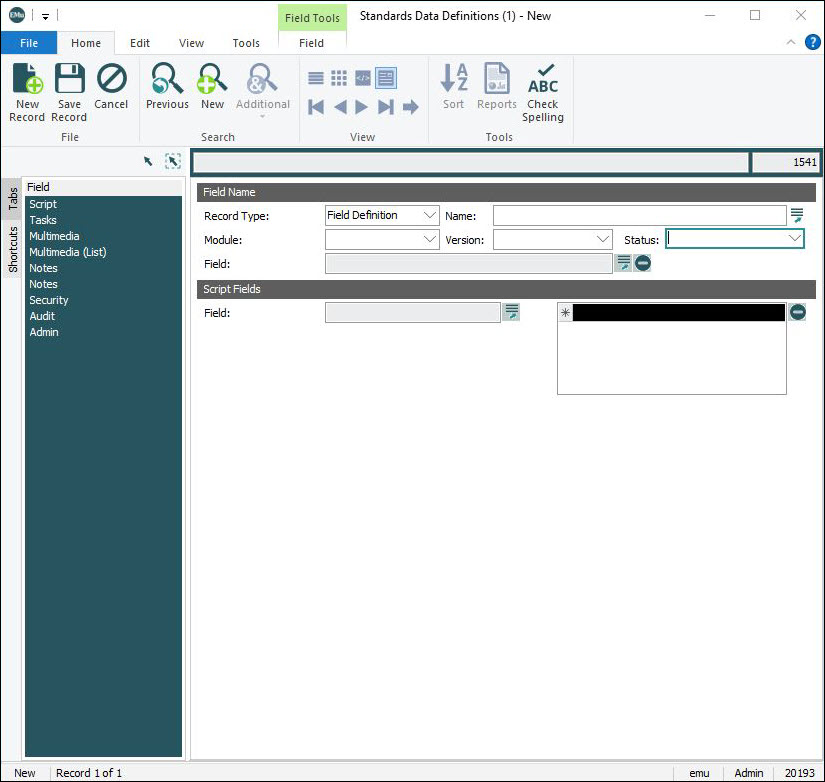
- Create a new record in the Standards module and select Field Definition from the Record Type drop list:
-
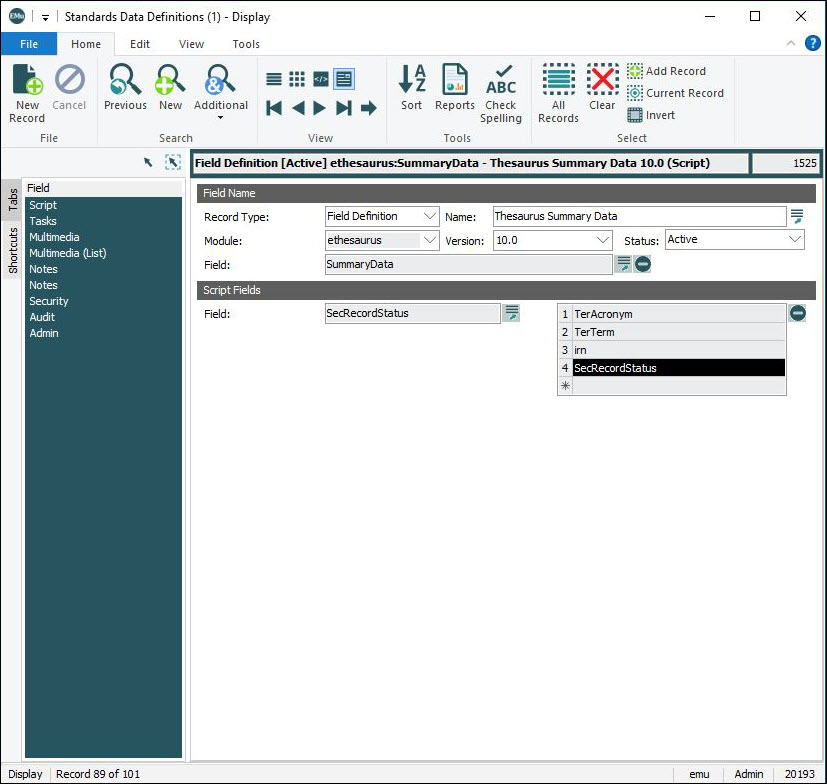
On the Field tab we name the field definition and define the module and field whose value is to be calculated. In Script Fields we select one or more fields whose values will be available to the script code when calculating the field value:
Field Name
Field Details Name
A descriptive name given to this Field Definition. The name generally includes the module and prompt of the field value being computed (e.g. Thesaurus Summary Data). The name does not have to be unique.
Module
The name of the EMu module containing the field value to be calculated. A drop list of available modules is provided. The list will only contain modules you are allowed to access.
Field
The field whose value is to be calculated. A list of available fields for the selected module is displayed when the Lookup List
 button is clicked. Only fields local to the selected module are displayed (fields referring to other modules cannot be calculated). Use the Delete
  button to remove the field.
Version
The version of EMu when the Field Definition script was last modified.
When a script is installed during an EMu implementation or upgrade, the EMu Version number is entered here (
10.0for an EMu 10 implementation or upgrade for instance). When EMu is next upgraded, if a new version of the script is available and the number in Version has not changed, the script will be replaced (and the Version number will update).If you have actively changed the script, it is therefore important to change the Version number, otherwise your version of the script will be replaced. As EMu versions can increment the decimal (10.0 to 10.1), change the number to something that will not match a possible EMu version (
10.001for instance ).Status
Document the current status of this Field Definition:
- Active
- New
- Pending
- Retired
Script Fields
Field Details Field
A Lookup List field. Click the Lookup List
button to display a dialogue listing available fields (along with any references and reverse
references) in the module specified in Module: (Field Name). References and reverse references can be nested to any level. Select a field to add it to the table. Note: The order of fields in the table is important as it defines the order of the field values passed to the script code.
[table]
A field selected in the Field Lookup List is added to the table. Fields can be reordered by selecting and dragging a row number to the desired position.
Use the Delete
button to remove a selected field from the table.Here we see an example Field tab for the Summary Data field in the Thesaurus module:
-
The Script tab is used to define a perl subroutine (
fieldFormat) for calculating the field value. It includes two fields: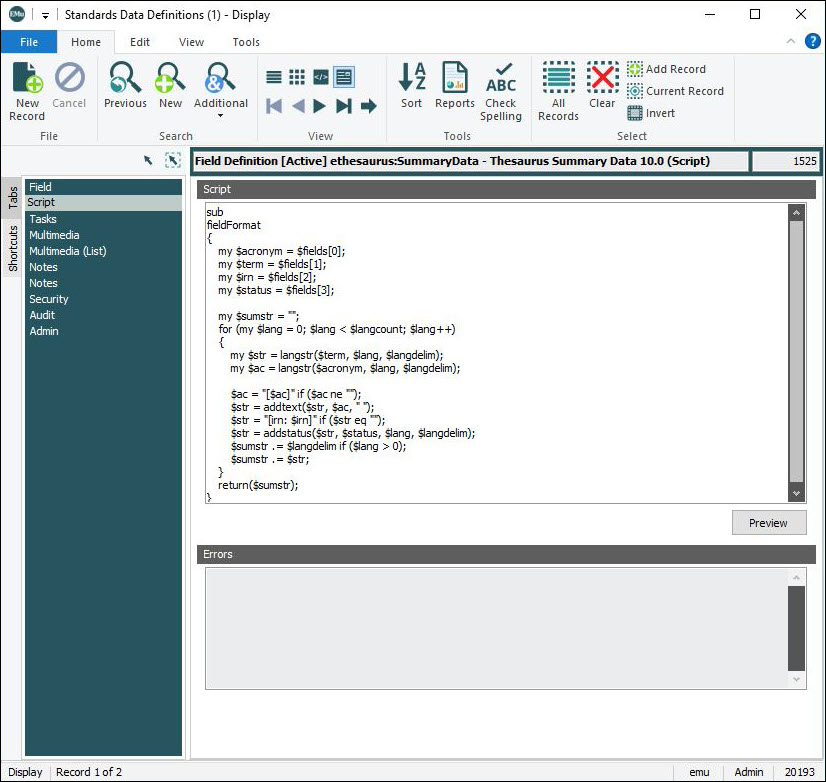
Field
Details
Script
Enter a perl subroutine to calculate the field value.
Tip: If a Preview Registry entry has been defined for this Field Definition (named in Name: (Field Name)), the Preview button will be enabled. Click the button to preview the calculated field value.
An empty perl script subroutine called
fieldFormatis added to the Script field when a Field Definition record is created: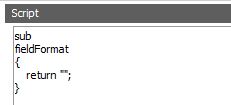
Modify the subroutine to produce the field value. The desired field value is set using the
returnstatement. In this example,return "";sets the field value to be empty.A
returnvalue of the perlundefleaves the field value untouched.Notes:
- Strict: the code for the subroutine must comply with perl’s
strictmodule and all variables used must be strictly defined. As such, each variable definition should be preceded with the reserved wordmy. - Container: the code for the subroutine runs within a container so that the execution of the code only allows value calculation and does not allow access to any perl functions that interact with the machine (operating system calls or file functions, for example).
Predefined variables
The following perl variables are available for access in the script code:
perl list of Script Fields values.
reference to a perl hash of Script Fields values.
reference to a perl hash containing system level Lookup List values.
delimiter used between different languages.
number of languages supported.
the date format string used in your EMu implementation.
the time format string used in your EMu implementation.
Each of these predefined variables is covered below:
Script Fields
When the script code is executed, the values of fields defined in the Script Fields list are passed to the executing code. The values are available through two perl variables:
Variable
Details
@fieldsThe
@fieldsperl array is a perl list containing the values of the Script Fields list in the order they are defined. For example, if the Script Fields list contains:- TerAcronym
- TerTerm
- irn
- SecRecordStatus
the
@fieldslist consists of the value of the field TerAcronym, followed by the value of TerTerm, followed by the value of irn, with SecRecrdStatus as the last value.An example of the perl
@fieldlist is:('AAT', 'Culture', 400016, 'Active')The perl list index can be used to access individual values. Using the previous example, the following list indexes can be used:
$fields[0](field TerAcronym, value'AAT')$fields[1](field TerTerm, value'Culture')$fields[2](field irn, value400016)$fields[3](field SecRecordStatus, value'Active')
$jsonThe
$jsonvariable is available for accessing Script Fields values. The variable is a reference to a perl hash, where the key is the field name and the value is the value of the field. Using the previous example, the following hash lookups can be used:$json->{TerAcronym}(field TerAcronym, value'AAT')$json->{TerTerm}(field TerTerm, value'Culture')$json->{irn}(field irn, value400016)$json->{SecRecordStatus}(field SecRecordStatus, value'Active')
Each field value passed to the script exists even if it is empty in EMu. This removes the need to constantly check whether a value is defined or exists.
The perl variables
@fieldsand$jsoncan be interspersed as required.Values
The perl representation of EMu field values depends on the field type. EMu supports:
- Atomic values: a single value.
- Nested values: a list of values. The field name ends with either
_tabor0. - Double nested values: a list containing a list of values. The field name ends with
_nesttab.
Atomic values
EMu atomic values are represented in perl as either a string or a number. The table below indicates the representation of an EMu value in perl:
EMu type Perl type Text String Integer Number Float Number String String Date String (yyyy-mm-dd e) Time String (hh:mm:ss.sss) Latitude String (dd mm SS D) Longitude String (ddd mm SS D) If an EMu field does not have a value (it is empty), an empty string (
"") is returned when accessing the value in perl.Nested values
EMu nested values are represented in perl as a reference to a list of values.
The type of each entry in the list is determined from the table used for atomic values; for example, a list of EMu text values is a list of string values in perl.
perl's index mechanism can be used to access individual values in the list. For example, if we have a Script Field named
Colours_tabwith values['Red', 'Blue', 'Green'], the following code can be used to access values:my $colours = $json->{Colours_tab}; my $first = $colours->[0]; my $second = $colours->[1]; my $third = $colours->[2];The number of values in the list is also available:
my $colours = $json->{Colours_tab};
my $count = (ref($colour) eq "ARRAY" ? @{$colour} : 0);
Note: Normally
@{$colour}would suffice, but perlstrictrequires the check to ensure an array (list) is being accessed.If an EMu nested field does not contain any values, an empty list,
[]is returned when accessing the value in perl.Double nested values
EMu double nested values are represented as a reference to a list of values where each value is a reference to a list of values. Each value's type is that of its associated atomic type.
perl's index mechanism can be used to access inner lists and individual values. For example, if we have a Script Field named
Countries_nesttabwith values[['Australia', 'Canada'], [], ['France']], the following code can be used to access the inner lists and then individual values:my $countries = $json->{Countries_nesttab}; # Inner list access my $first = $countries->[0]; my $second = $countries->[1]; my $third = $countries->[2]; # Individual values access my $firstfirst = $first->[0]; (returns 'Australia') my $firstsecond = $first->[1]; (returns 'Canada')If the EMu double nested field does not contain any values, an empty list,
[]is returned when accessing the value in perl. If an inner list does not contain a value, an empty list,[]is returned for that value.When returning a value in the script code to set a field value, the perl value returned must match with EMu's field type for the field:
- For an EMu atomic field either a string or number must be returned in the correct format (e.g. for a date field the value must conform to
yyyy-mm-dd). - For a nested field a reference to a perl list containing the values to set must be returned.
- For a double nested field a reference to a perl list where each value is a reference to a perl list with each inner list contains the value to be set.
To clear an atomic field, return an empty string
""; and to clear a nested or double nested field, return a reference to an empty list[].Reference fields
If the Script Fields list contains a reference field, the perl representation of the field value is that of each component in the reference field.
For example, if a Script Fields field is an entry consisting of a list of reference values where each reference refers to a list of values, then the perl value will be a reference to a list where each entry is a reference to a list containing the value.
Following a series of reference fields can result in quite complex perl values.
Reverse reference field
If the Script Fields list contains a reverse reference field, the perl representation of the field is a reference to a list of values, where each value is determined by the perl representation of what follows the reverse reference field.
Consider
The perl representation is a reference to a list for a reverse reference field. However, a reverse reference field can reference another field (local, reference), something like
reversref.ref_tab.local. In this case thereverserefis a reference to a list, each entry in the list is a reference to a list since aref_tabfield is represented by a reference to a list and in that list each value is a string for local. Hence the bit after the.determines the rest of the perl structure.For example, if a Script Fields field is a reverse reference field referencing a single value, then the perl value will be a reference to a list of values. If however the reverse reference field referenced a list of values, then the perl value would be a reference to a list of values where each value is a reference to a list of values.
Multiple Languages
If multiple languages are enabled in your implementation of EMu, script code needs to ensure values generated for multilingual fields contains values for all languages:
- The predefined
$langcountvariable contains the number of languages supported by your EMu implementation. If the number is greater than one, ensure that the field value returned caters for all$langcountlanguages. - The predefined
$langdelimvariable contains the delimiter that must appear between each language value. For example, if$langdelimcontains the value;:;and$langcountis set to two, a returned field value should look likelanguage 1;:;language 2.
When writing generic script code where the number of languages supported is unknown, you will see script code that loops based on the number of languages:
my $sumstr = "";
for (my $lang = 0; $lang < $langcount; $lang++)
{
  my $str = langstr($term, $lang, $langdelim);
  ...
  $sumstr .= $langdelim if ($lang > 0);
  $sumstr .= $str;
}
The code above loops through each of the supported languages, using
$langcount. For each language we extract that language value from a field's value (via the predefinedlangstr()function). We then build up the return string by appending the language delimiter$langdelimif we are processing additional languages and then append that language's value. The result in$sumstris the field value for all languages with the correct delimiter between each language.Tip: If your version of EMu does not support multiple languages, the loop can be removed and the code simplified to only manipulate complete field values.
Predefined Functions
A number of predefined functions are available for use in script code:
langstr($value, $lang, $langdelim)Used to extract a language specific entry from the
$valuestring:$valueis a string, typically a value from an EMu field.$langis a number, which indexes into the language to get (it is zero based).$langdelimis the delimiter used between languages in$value. Note that$langdelimis predefined so you do not need to set it.
If there is no value set for a given
$langindex, the first non-empty value is returned.addtext($prevalue, $postvalue, $join)Returns
$prevalue$join$postvalueif both$prevalueand$postvalueare not empty:- If one value is empty, the other is returned.
- If both are empty, an empty string is returned.
addstatus($str, $status, $lang, $langdelim)Prepends the
$statusvalue for the given$langindex to$strif$statusis not empty and$statusdoes not equal theEMUDEFAULTSTATUSenvironment variable setting.In other words, it only prepends the status if it is not the default value.
formatdate($string, $format)Returns a string containing a date value formatted using
$format. The value of$stringmust conform to the dateyyyy-mm-dd eformat, which is the format used when a date field is requested in the Script Fields list (details about date formats here).The date format defined for your version of EMu can be accessed via the predefined
$ENV{dateformat}environment variable. The callformatdate($string, $ENV{dateformat})will return a date in the format displayed in the EMu client.formattime($string, $format)Returns a string containing a time value formatted using
$format. The value of$stringmust conform to the timehh:mm:ss.sssformat, which is the format used when a time field is requested in the Script Fields list (details about time formats here).The time format defined for your version of EMu can be accessed via the
$ENV{timeformat}predefined environment variable. The callformattime($string, $ENV{timeformat})will return a time in the format displayed in the EMu client.formatlatlong($string)Returns a latitude or longitude string formatted using the
d m s Dformat. The value of$stringmust conform to the latitude / longitudeddd mm SS Dformat, which is the format used when a latitude / longitude field is requested in the Script Field list (details about latitude and longitude formats here).System Lookup Lists
The predefined
$lutsvariable is a reference to a perl hash where the key is the name of a system Lookup List and the value is the value assigned to that Lookup List value. For example, the value$luts->{Yes}returns the value assigned to the SystemYesLookup List (a string that contains the valueYesbased on the languages supported by your EMu installation).Note: When accessing System Lookup List data the name (with the word
Systemremoved) of the System Lookup List is used to get its value. For SystemYesthis isYes, i.e.$luts->{Yes}Debugging
When developing script code it may become necessary to debug the code to ensure the correct field value is calculated.
The easiest way to debug code is to set a Preview Record Registry entry, which allows you to preview the result of the code. Once a preview record has been set, the Preview button on the Script tab can be used to view the calculated field value.
You can use a premature
returnstatement to view the value of variables, including field values passed to thefieldFormatfunction. For example, consider the following code:sub fieldFormat { my $acronym = $fields[0]; my $term = $fields[1]; my $irn = $fields[2]; my $status = $fields[3]; return($acronym); }The
returnstatement will result in the value of$acronymbeing shown when the Preview button is clicked. With this approach, single values can be checked as the script code is developed.A second way to debug script code is to use the perl
printstatement. Any output generated via aprintstatement is placed in thestandardsbackground load log file. The log file is located atloads/standards/logs/currenton the EMu server. To generate any output fromprintstatements, the Preview button must be clicked to execute the script code.Errors
A read-only list of errors identified in the perl routine. All errors must be resolved before the field value can be generated.
- Strict: the code for the subroutine must comply with perl’s